Intro to Pedals Part 5: Signal Chain

Effective pedal order is a subject that used to be treated as a great mystery, as though the correct signal path for each guitarist can only be known by them exclusively, and even then only after some kind of mystical revelation.

That’s absolute rubbish of course. People have been experimenting with their signal chains for decades now, common results have been documented, and a rough idea of best practice has been arrived at. In this post we’ll go over what that “best practice” looks like, why it works the way it does, and help you decide if, when, and how to “break the rules” so to speak.

Let’s get into it.

Standard Practice

Pitch

First of all, anything that needs to track the pitch of your guitar should get the cleanest, most unadulterated signal that it can if you want it to have a sporting chance of doing its job properly. By this I’m referring to your tuner, pitch shifters like the Digitech Drop and Whammy, and perhaps even octave pedals.


Gain

After that, it’s a good idea to have your drive section towards the start of the chain. This includes fuzz, overdrive, boost, and distortion.

Drive pedals typically define your EQ and gain level, which form the core, fundamental part of your tone. From that perspective it makes sense to establish this first before letting other pedals do freaky things with your core tone later in the chain.

Putting drive pedals after other pedals can radically change the way they sound. There are definitely situations where that can sound cool, but we’ll cover those later. For now let’s keep things fairly simple and vanilla.


Modulation

Next in the chain would be modulation pedals. This is the wobbly stuff:

  • Vibrato (modulates your pitch up and down rhythmically)
  • Chorus (splits your signal in two and applies vibrato to one of them)
  • Phaser (splits your signal in two and moves them in and out of phase with each other)
  • Flanger (splits your signal in two and adds a subtle delay to one of them, creating a swooshing effect)
  • Tremolo (modulates your volume up and down, creating a shimmery or choppy sound).

Modulation pedals add character and create a sense of movement to the core tone you established in your drive section.


Time

After modulation we deal with time and space via delay and reverb. The idea of these is to take your whole signal and make it sound like it’s echoing back from or reverberating off the walls of a large space. For that reason you might want to send all of your effects into these.


The Fight for Last Place

Given that tremolo works by rhythmically dropping your volume, it’s possible that reverb tails or delay repeats which fall in that otherwise silent space might counteract the feel of it. For this reason, some people like to put tremolo at the end of their chain.

Then again, putting tremolo after delay creates the possibility of that silence coinciding with delay repeats, making it feel as though the delay isn’t turned on at all. The other possibility is your dry signal being silenced by the tremolo and only allowing the repeats through. The most likely scenario would be a mess of both. Best to experiment if you want to use delay and tremolo at the same time.


The Fight for First Place

For all their tough-guy image, some fuzz pedals can be total princesses about their input impedance. This means if they’re not the very first pedal in your chain they can behave like a spoilt brat.

Wah pedals typically go before your drive section to function properly, so if you have temperamental fuzz, you might have some experimenting and prioritising ahead of you. You’re in for a real headache if you have a fussy fuzz, a wah pedal, and a pitch-based effect that you intend on using at the same time.

The big picture looks something like this:
Pitch – Gain – Modulation – Time

I’ve seen some people on guitar forums post the chart below from Roland, stating that it’s all you need to know on the subject of signal chain. As we’ve just seen though, it’s not that simple.

There are a few issues that make it not terribly helpful for new guitarists trying to get their heads around signal chain issues:

  • It makes no attempt to include a fuzz
  • It does not tackle the tremolo dilemma
  • It includes a Metal Zone. Honestly, what kind of message are they trying to send to new guitarists? What’s next? Handing out crack at a kindergarten?


Gain Stacking

Hopefully you’ve now got a decent idea of standard practice for the order of most pedal types. Within your drive section though, you might have a bunch of different types of gain pedals. Let’s have a look at how you might want to order them.

Just in case your fuzz pedal is the sort of entitled infant that will throw a hissy fit if it’s not first in line, we’re going to give it what it wants: Fuzz first.

Of course you love your Fuzz. It’s ok to feel sick of its bullshit from time to time.

From there though, you need to consider what you want your drive pedals to do.

If you want one pedal to provide a volume lift for another, you would place the heavier gain pedal first and the lighter gain pedal second. Order your drives from heaviest to lightest to get a big, high headroom drive sound.

If you want one pedal to add more distortion to another, you would place the lighter gain pedal before the heavier one. Order your drives from lightest to heaviest to end up with a chain of cascading nastiness.


Breaking the Rules

The number one piece of advice handed out to people who ask about pedal order is to “try it out for yourself”. Fortunately for you I’m not a complete asshole, and I acknowledge what a pain it can be to completely re-route your pedal board just to see what will happen. In this next part I’m going to try to explain the most likely outcome should you stray from standard practice.

That’s not to say you shouldn’t experiment. No one’s going to call the cops if you put your reverb first in your chain and your fuzz pedal last. There’s a pretty good chance you won’t enjoy the outcome, but you are of course free to do what you want. Experimenting and listening will no doubt give you a much better perspective than reading about it in a blog post.


Gain after Modulation

Placing drive after another kind of pedal will take its signal and compress it, smoothing it out and making it more consistent. With modulation, that kind of defeats the purpose.

Then again, maybe you have a modulation pedal that’s a little bit drastic for your tastes. Putting a subtle overdrive after it could tame it nicely. This would be a sensible reason to put drive after modulation.

Having said that, putting a killer high-gain metal distortion after modulation probably won’t be as kick-ass as you’re hoping. The distortion would sound more impressive with a clean signal going into it, and would only work to minimise and muddy-up the modulation.


Gain after Delay

Delay repeats typically decay or get quieter as they go on. If you put a drive pedal after it though, the compression will interfere with that decay. Repeats will continue for longer and potentially crash into each other. It’s a big, chaotic noise that might be fun to play with, but not what most folks have in mind when they reach for a delay pedal.

A slap back delay (one repeat with an extremely short delay time) can work either side of a drive without issue.


Gain after Reverb

Similar to the issue with repeat decay in delay pedals, putting a drive pedal after reverb will make the reverb tails carry on longer and create a big, chaotic noise. Again, fun to play with, but practically unusable unless you’re in a shoe-gazer band or avant garde noise act.


Using the Effects Loop

If your amp is already breaking up without the use of drive pedals, then your amp is acting like an overdrive pedal at the end of your chain. If you’ve taken anything from this article so far you’ll know this could be problematic.

While there’s probably a whole article I could write about how amps work, for now let’s just look at the two main parts: the pre amp and the power amp.

The pre amp sets the gain and EQ of your signal before handing it over to the power amp, which makes the whole thing louder. It’s the pre amp which is likely causing your amp to overdrive.
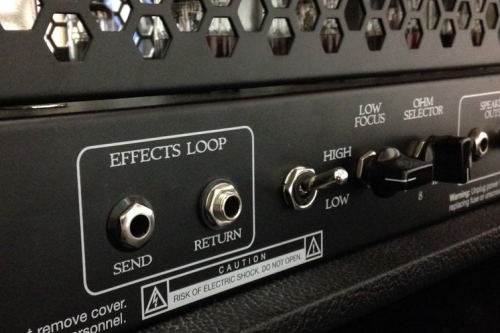
An effects loop lets you plug a few pedals between your pre amp and power amp. If you use your pre amp for your drive sounds, you can still maintain your signal chain by putting your modulation, delay, and reverb pedals in the loop.


What about a Phrase Looper?

There’s often confusion about where to put a loop pedal. These typically go at the end of your chain before your amp so they can catch everything, but again, you don’t have to do what everyone else does. Just remember that it will record anything you put in front of it, and its playback will be affected by anything you put after it.


Where Do I Put My EQ Pedal?

Put your EQ pedal wherever you feel the EQ correction needs to be made. If you’re trying to counteract a tonal quality of a specific pedal (like put some mids back in if you’re using a Muff, or bottom end if you’re using a Tube Screamer) put the EQ immediately after the pedal in question.

EQs can be fun to play with in your drive section. Just turning the level up can make it work like a boost. Cranking a specific frequency before sending your signal into a drive pedal will make that frequency overdrive more.


That’s All For Now

Hopefully that should cover most of the common questions that pop up around all things signal chain.

If I could impart any advice on the subject it would be to have a clear idea in mind about what you want to achieve before you start plugging things in, to save a lot of mucking around. Also, having said that, feel free to experiment and let your ears guide you.

Oh, and if you see this guy lurking around outside your school trying to sell Metal Zones: JUST SAY NO!

Intro to Pedals Part 3: Power Supplies

So far we’ve looked at why you might want to alter your sound with pedals, and outlined a sensible approach to discovering which pedals might be relevant to you. I’ve covered how multi effects units aren’t completely useless, but that few people stick with them, they don’t hold any re-sale value, and as such aren’t where you want to spend the bulk of your gear budget.

If you’ve been following so far you’ll probably have a few pedals and have plugged them in and started having fun with them. It’s time to start thinking about power solutions.

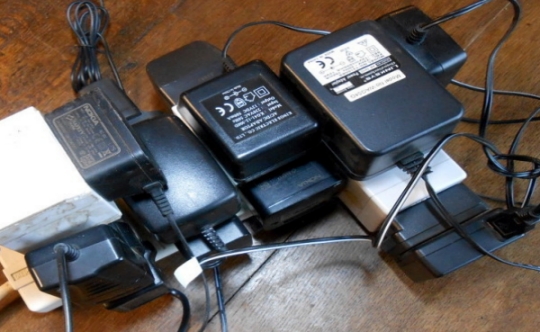
Powering pedals can be fairly impractical. You’ll either go through a lot of 9 volt batteries or have a comical arrangement of wall-wart power adapters. Surely this isn’t what the pros do?

There are of course more practical solutions. Before we get into those, we’ll need to pause for a moment and get a boring but essential bit of science out of the way. When plugging a power lead into a pedal you always need to consider four things:

Voltage, Current, Polarity, and Isolation


Voltage

Most pedals operate at 9 volts, some require more, and some can take more (eg overdrive pedals with different amounts of headroom available). Not providing enough voltage might not damage your pedal, but it will quite likely sound horrible. Providing too much voltage will almost certainly fry your pedal. Before you power up a pedal, be sure of its voltage requirements.


Current

This is a simple concept which confuses many. Current is measured in amps (A) or milliamps (mA), and is a way of measuring how thirsty a device is, not a limit on how much electricity you can throw at it. The mA requirement of your pedal is the minimum it requires to function, and likely how much it will draw from your power supply.

It is perfectly safe to connect a 200mA power supply to a pedal requiring 100mA. The power supply will make 200mA available, but the pedal will only take the 100mA that it needs. If a power supply doesn’t provide enough mA, the pedal won’t function properly or even turn on. Best practice is to have your power supply offer more mA than your pedal requires.


Polarity

Like the tip and the sleeve on your audio cables, power cable connectors have two separate parts to consider. They will either be centre positive or centre negative.

Most pedals will be centre negative, but occasionally (like with some old Proco Rats) you’ll get one that’s centre positive. Be sure of which way around your power lead is, and which way your pedal is designed. If you get this wrong your pedal will either simply not turn on, or end up completely fried. Toss a coin. Whatever the outcome, you’re not going to be using that pedal today.


Isolation

This refers to making sure your pedals don’t share a ground connection.

Pedals often use their ground connection like a sewer line. They dump certain audio frequencies (like the clipped part of your signal in a drive pedal) by sending them to ground. If you hook your pedals up so they share a ground connection (think “pedal sewer line”), these audio artefacts, along with some electricity, could end up being reintroduced to the audio signal of other pedals in your chain. Just like you wouldn’t want your neighbours’ sewerage backing up in your house, your pedals don’t want to be awash with crap from other pedals in the chain.

This could result in anything from a mild, low level hum all the way through to crazy, high-pitched, whistling oscillation noises which can be tricky to troubleshoot.

For example, some folks will complain that a delay pedal at the end of their chain is making a weird noise, when in fact a fuzz pedal at the start of the chain is generating it. It might just be that only the delay pedal is picking it up and making it audible. The solution is not to remove the fuzz or the delay, but to make sure they’re not sharing a ground connection.

So What Should I use?

Daisy Chains

The first thing most rookies try, no doubt because of the low cost and simplicity of it all, is to daisy chain your pedals. This involves one power adapter which plugs into a series of connected cables. This might work for some pedals some of the time, but is generally considered a horrible idea.

All of your pedals are drawing their power from the one source, potentially under-powering them, leading to them not functioning correctly and not sounding quite right. The more noticeable problem though is that they all share an earth connection which could lead to audio interference between pedals (see isolation section above).

If you insist on doing this, you can get away with it under some circumstances. I’d maybe consider it if you have a simple pedal board with only a tuner and a drive pedal or two.

Mixing digital and analogue pedals seems to be the main issue. I believe analogue pedals tend to generate most of the noise in a shared ground connection, while digital pedals pick it up and make it audible. While we’re at it, digital pedals should probably be isolated from each other too. When it comes to power, they just don’t play well with others.

Of course, make sure the adaptor at the start of your daisy chain is providing the correct voltage and enough current for all of your pedals. You’ll typically want a 9v adaptor with a crazy high current. Add together the mA draw of all the pedals you’re going to daisy chain, and make sure the power supply can offer at least that much, preferably more.

1 Spot are the kings of daisy chain solutions, while most other budget pedal brands like Mosky, Donner, and Joyo tend to have something on offer.


Power Bricks

You can buy a power “brick” which takes up only one wall socket space, will convert your AC mains power into DC power at the correct voltage for your pedals, and will have multiple outlets for your pedals to plug into.

They vary massively in price, so let’s have a quick look at what you’re paying for and which features might be important to you.

Some bricks provide surge protection, and most should provide clean, regulated power to your pedals.

The main thing which separates the cheap power supplies from the expensive ones is isolation. The whole point of getting one of these is to provide isolated power to your pedals, so it makes no sense to get one which doesn’t. There are inexpensive ones which are nothing more than a tidier version of a daisy chain solution, offering no isolation whatsoever.

Maddeningly, some claim to be “isolated” while not actually being isolated in the sense we’re thinking of. The power supply itself is isolated from other devices, sure, but we want each of its outputs to be isolated from each other. Look for the words “isolated outputs” or something like that. Don’t be content with merely seeing the word “isolated” in the product description.

The number of outputs will have an impact on the price. Get one with more outputs than you think you need. I don’t care if you think you have all the pedals you’ll ever need to power up, I know you’re lying to yourself even if you don’t. If you get a five outlet power supply, don’t come crying to me when pedal number six shows up and you have nowhere to plug it in.

However much you save by getting the smaller power supply, think of how much more expensive it will be when you have to buy a second one. It will happen. You’ve been warned.

Some will come with a few outputs which are a higher voltage. This can be handy if you have pedals which require more than 9 volts, or it could be a waste of an output if you don’t. Some of these will be switchable between 9 volts and 12 or 18 volts, which is the best option. Just make sure you’re not paying for a power supply with outputs you can’t use.

Just like with the daisy chain solution, you’ll need to figure out how much current you need. Add up the mA of all of your pedals, and make sure the power supply you get can deliver equal to or greater than that amount. There’s no point getting a power supply with over 20 outputs if it only has enough mA to drive one pedal.

Also consider the size of the power supply. If you intend on sticking it underneath a pedal board, you need to make sure it will fit.

It used to be the case that no modest budget power bricks were isolated, and if they said they were, it was mere marketing trickery. That’s not the case as much these days. Check the specs and read reviews. You’ll find many units where someone has bought one and tested the outputs with a multimeter to confirm if they are indeed isolated.

At the budget end of the spectrum, have a look at Caline and Mosky. At the more mid-priced to professional end have a look at:

Probably one of the most expensive yet best value power supplies on the market is from GigRig. They provide a modular solution, meaning when you run out of outputs, you’re not stuck having to buy a whole new power supply. You can simply buy another adaptor with more outputs and plug it into an output of the unit you already have.

To kick start the whole thing, you buy their “Generator”. This provides clean, regulated, surge protected power at a whopping 5 Amps. From there you plug in a “distributer” which gives you 4 outputs. Into each one of those outputs you can plug in an “Isolator” which each provide 4 isolated outputs. This results in 16 isolated outputs. If pedal number 17 ever turns up you can get another isolator and plug it into one of the outputs of one of your other isolators.

GigRig pride themselves on being the best in the business when it comes to durability, quality control, aftermarket support, and most importantly making sure your guitar tone remains pure and untainted. For the record, I don’t have an affiliate marketing arrangement with the GigRig. It’s common knowledge in the industry that GigRig is the Rolls Royce of pedal power supplies.


Next time we’ll look at pedal boards themselves, patch cables, and a few things to look out for when putting it all together.